
Shout out to East Charmer and her youtube tutorial! https://www.youtube.com/watch?v=GsmJowwIh8Q
Everything did not go as smooth as I wanted as far as the install. Because of this, I had to do a few troubleshooting steps. I ran into an issue with the Server Roles and the DNS Server portion. I was getting the error message “No static IP addresses were found on this computer.”. In order to fix this, I had to change my static IP configuration through the VM terminal. Afterwards, I still had issues with it taking so I did shutdown /t /r 0 to shut down the VM and restart it. After doing so, the static IP was applied and it took!
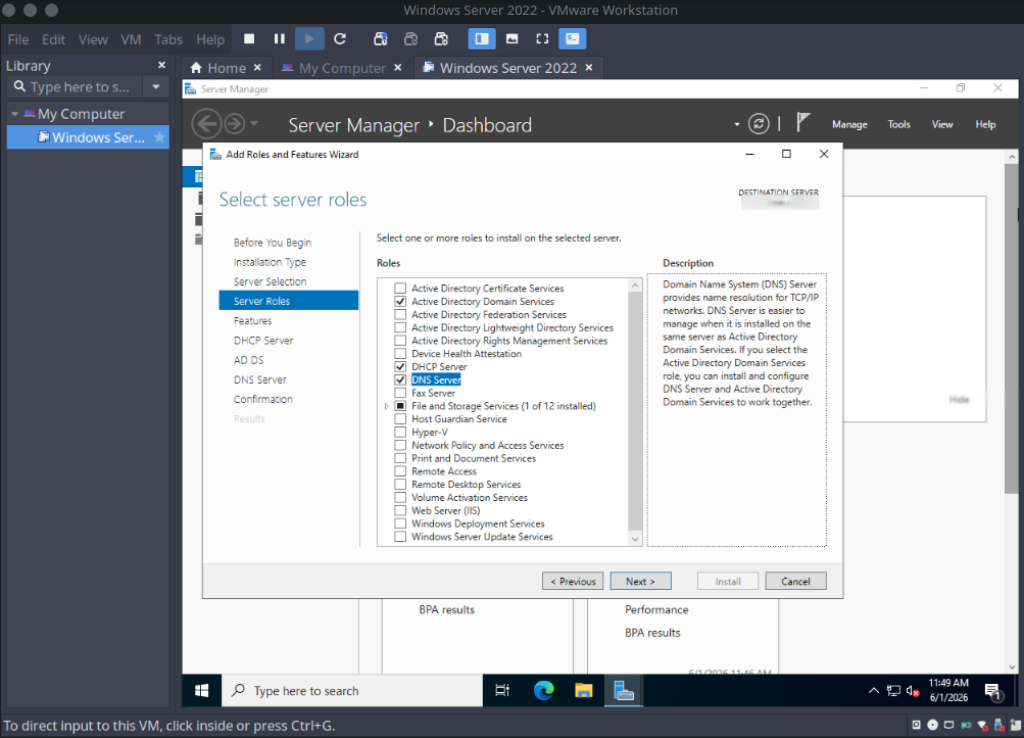
I set up the Domain Controller with this selection:
– AD Domain Services
– DNS Server
– DHCP Server
– Group Policy Management
The tutorial has other things set up initially but I skipped these with feedback from the AI chat, through DuckDuckGO AI(shoutout!), I had assisting me with this setup.


Going into Active Directory Users and Computers, I set up the the USA, Europe, and Asia as OUs.

After this, I nested Users, Computers, Groups and Servers to each location.


The next step I took was to add the Zombie Rollz user, as well as IT Security Group and DL-ITAdmins as a Distribution Group.

Building my computer with Parrot OS and setting up a Windows VM on this desktop has been really fun! Previously on my laptop I did Windows OS > Linux VM. I’ve learned a lot and started to use GIMP for snipping and editing my pictures. I plan on doing some more project work through my VM and will be sure to post future blogs of that soon while I continue to study for Azure and cybersecurity!