
https://tryhackme.com/room/tsharkcliwiresharkfeatures
Created by: Tryhackme

In task 2, Command-Line Wireshark Features I | Statistics 1, we are are shown the ability to present a more Wireshark-like appearance in the CLI. Pretty neat!

“Use the “write-demo.pcap” to answer the questions.
What is the byte value of the TCP protocol?”

“In which packet lengths row is our packet listed?”

“What is the summary of the expert info?”

“Use the “demo.pcapng” to answer the question.
List the communications. What is the IP address that exists in all IPv4 conversations?
Enter your answer in defanged format.”


“On to Command-Line Wireshark Features II | Statistics II!
Use the “demo.pcapng” to answer the questions.
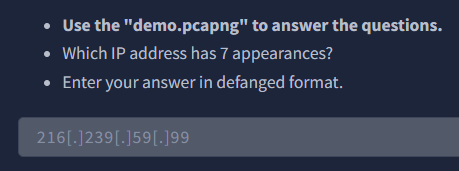
Which IP address has 7 appearances?
Enter your answer in defanged format.”
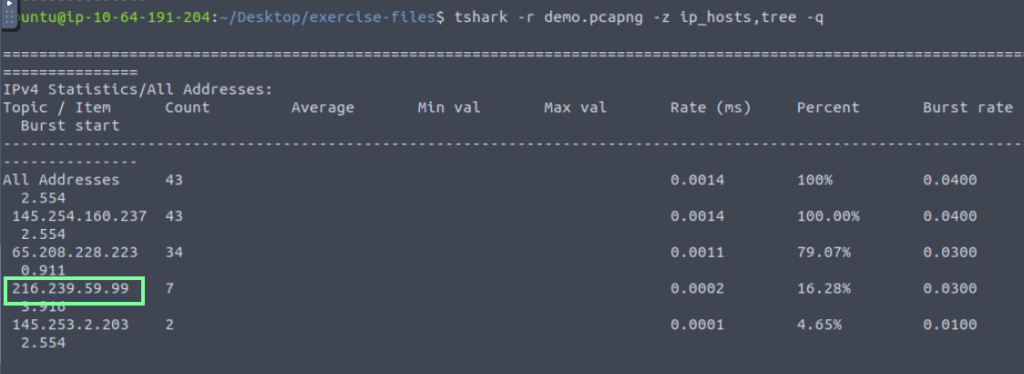
What is the “destination address percentage” of the previous IP address?

“Which IP address constitutes “2.33% of the destination addresses”?
Enter your answer in defanged format.”

What is the average “Qname Len” value?

On to Command-Line Wireshark Features III | Streams, Objects and Credentials!
“Use the “demo.pcapng” to answer the questions.
Which IP address has 7 appearances?
Enter your answer in defanged format.”


“What is the “destination address percentage” of the previous IP address?”

“Which IP address constitutes “2.33% of the destination addresses”?
Enter your answer in defanged format.”


What is the average “Qname Len” value?

On to Command-Line Wireshark Features III | Streams, Objects and Credentials!
“- Use the “demo.pcapng” to answer the questions.
Follow the “UDP stream 0”.
What is the “Node 0” value?
Enter your answer in defanged format. “


Follow the “HTTP stream 1”.
What is the “Referer” value?
Enter your answer in defanged format.

Time for cyberchef!


“Use the “credentials.pcap” to answer the question.
What is the total number of detected credentials?”

In the above image, you see that there is a column for “Username”. With the below command, it’s counting that so just subtract that to get the answer.


On to “Advanced Filtering Options | Contains, Matches and Extract Fields”!
“Use the “demo.pcapng” to answer questions.
What is the HTTP packet number that contains the keyword “CAFE”?”

“Filter the packets with “GET” and “POST” requests and extract the packet frame time.
What is the first time value found?”

On to the last task, Task 6 Use Cases | Extract Information! In this task, we are shown how to extract hostnames, extract DNS queries, and extract user agents with tshark.
“Use the “hostnames.pcapng” to answer the questions.
What is the total number of unique hostnames?”

“What is the total appearance count of the “prus-pc” hostname?”

“Use the “dns-queries.pcap” to answer the question.
What is the total number of queries of the most common DNS query?”

“Use the “user-agents.pcap” to answer questions.
What is the total number of the detected “Wfuzz user agents”?”

“What is the “HTTP hostname” of the nmap scans?
Enter your answer in defanged format.”

